Logon
Nederlands, English
Donate to ASK-Solutions (IRADIS Foundation)

Backups and recovery

Backups are not just a technical setting. A backup only helps when the right data is included, the backup is protected, recovery has been tested, and the people involved understand what to do when something goes wrong.

ASK-ICT-Solutions helps people and organisations understand, set up and maintain practical back-up and recovery routines. The aim is not only to copy files somewhere, but to make sure important information can actually be restored when a computer breaks, a file is deleted, ransomware strikes, an account is lost or a service becomes unavailable.

Understanding what needs protection

The first step is to look at what data exists and where it is stored. Important information may be on a computer, laptop, phone, NAS, cloud drive, mailbox, accounting system, website, webshop, CRM, shared folder, external drive, USB stick or old export that nobody thinks about anymore.

Together we map what is important, which data changes often, which data is sensitive, which systems are needed to keep working, and how much time or information could be lost before it becomes a serious problem.

Cloud storage is not automatically a backup

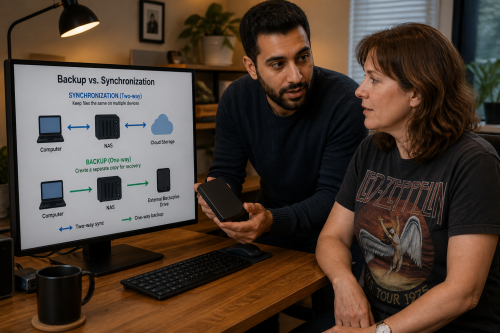
Services such as cloud drives, shared folders and network storage can be useful, but they are not automatically a backup solution. They may synchronise mistakes, deleted files, ransomware-encrypted files or corrupted data to every connected device.

A good backup plan looks at different risks: accidental deletion, hardware failure, theft, fire, ransomware, account loss, software mistakes, provider problems and human error. Sometimes the answer is a combination of local, offline and offsite backups rather than one system that seems convenient but fails in the same way as the original data.

Multiple layers of backup

For many situations, a layered backup approach is safer. One copy may be fast and local, so a deleted file can be restored quickly. Another copy may be offline, so ransomware cannot immediately reach it. Another copy may be offsite, so data is not lost if equipment is stolen or damaged.

The exact setup depends on the situation. A household, small office, workshop, care-related activity, webshop or organisation with customer records all have different needs. We explain the trade-offs so the chosen backup routine is understandable and realistic to maintain.

Recovery and restore testing

A backup that has never been tested is still a question mark. It is important to know whether files can be restored, whether the right versions are available, whether passwords and encryption keys are documented, and how long recovery would take.

We can help test restores, practise recovery steps, document what to do, and explain the difference between restoring one file, restoring a folder, rebuilding a computer, recovering a server, restoring a website or continuing work after a larger incident.

Backups, privacy and access

Backups often contain personal data, customer data, mail, documents, account exports, website databases or other sensitive information. That means access, encryption, retention and deletion matter.

We look at who can access the backups, where they are stored, how long they are kept, whether they are encrypted, which external services are involved, and how the backup routine matches privacy and data-protection responsibilities. The goal is to protect data without creating hidden copies that nobody manages.

Ransomware and continuity

Ransomware makes backup planning more serious. If all backups are online and writable from the same infected computer or account, they may be encrypted together with the original files. Recovery then becomes much harder.

We can help design backup routines that are harder to destroy accidentally or maliciously. This can include offline copies, separated accounts, limited permissions, version history, immutable or protected storage where appropriate, and clear recovery steps.

Maintenance and monitoring

Backups need maintenance. Storage fills up, schedules stop running, passwords change, software needs updates, old devices fail, and new folders or systems may not be included automatically.

Depending on the situation, we can help set up checks, reminders, documentation and periodic review. Where agreed, backups can also be checked or maintained with you, so problems are noticed before the backup is needed.

Learning how to use the backup

A backup system should not be mysterious. We explain where the backups are, what they contain, how to check them, how to restore a file, what not to overwrite, and which steps to take in an emergency.

Where useful, we let people practise. Restoring a test file, checking a backup log, replacing a backup drive or following a recovery note once in a calm situation can make a real incident much less stressful later.

Possible results

The result may be a clear backup plan, a working local backup, an offline copy, offsite storage, a tested restore, documented recovery steps, better protected customer data, fewer unnecessary copies or a disaster-recovery plan for a website, workstation or small organisation.

The common thread is control. You should know which data is protected, where the copies are, who can access them, how recovery works and what still needs attention.

ASK-Solutions complies with ISO 9001:2008 quality assurance